Classic Protocol Extension (CPE) is a project to augment the Minecraft Classic network protocol with new and improved functionality.
Extensions are designed to keep extended clients and servers compatible with standard clients and servers. Standard clients and extended clients can play on the same server side-by-side. Extensions are designed to be modular: custom clients and servers can selectively implement any subset of extensions, and only mutually-supported extensions will be used.
Custom servers that fully support CPE: MCGalaxy ProCraft
Custom servers that partially support CPE: D3PP, MCYeti, Obsidian, ProjectObsidian, D3, fCraft, FemtoCraft, LegendCraft, GemsCraft, Hypercube, MCSong, ClassiCH
Custom servers that plan to add support: 800Craft, cloudBox, GGS
Custom clients that fully support CPE: ClassiCube Client, ClassicalSharp
Custom clients that plan to add support: Charged Miners, GemsClient
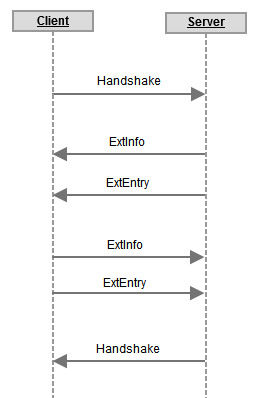
When CPE-capable client connects to a CPE-capable server, a brief negotiation needs to happen before any extensions are used. Client and server declare their capabilities and determine which extensions are mutually supported. All CPE-capable software is required to support this.
Client behavior: Extended clients must use magic
number of 0x42 (66 decimal) for the padding
byte of the PlayerIdentification
packet. It must then await a response. If server responds with any
packet other than ExtInfo, client must assume that the
server does NOT support CPE. If the server responds with an
ExtInfo packet, client must parse it and any
ExtEntry packets that follow. Client must then compare
its locally-supported set of extensions with the list of extensions
provided by the server, and find an intersection of these sets. These
are the mutually-supported extensions. Client must now send
ExtInfo packet of its own, followed by a list of zero
or more client-supported extensions. After sending the last of
ExtEntry packets, client should activate all
mutually-supported extensions and resume normal login procedure.
Server behavior: When a client connects, server must
read the PlayerIdentification
packet and check its padding byte. If this byte is set to
0x42 (66 decimal), assume that the client
supports CPE. If this byte is set to any other value, assume that the
client does NOT support CPE.
Server must immediately reply to CPE clients with an ExtInfo packet, followed by zero or more ExtEntry packets, and await a response from the client. Client will respond with one ExtInfo and zero or more ExtEntry packets. Server must then compare its locally-supported set of extensions with the list of extensions provided by the client, and find an intersection of these sets. These are the mutually-supported extensions. After receiving the last of ExtEntry packets, server should activate all mutually-supported extensions and resume normal login procedure.
Note 1: All standard/non-extended clients use
0x00 for the padding byte. All standard servers ignore this
padding byte. Therefore, this negotiation process does not affect
compatibility with standard software.
Note 2: Do not make any assumptions about supported functionality based on the AppName field of ExtInfo packet. It's for logging purposes only.
Note 3: Do not declare support for an extension until it is FULLY implemented, except for debugging.
ExtInfo packet
Packet ID |
Field Name |
Field Type |
Example |
Notes |
|---|---|---|---|---|
0x10 (16) |
AppName |
string |
|
Client or server software name |
ExtensionCount |
short |
1 |
Between 0 and 32767 |
|
Total Size: |
67 bytes |
|||
ExtEntry packet
Packet ID |
Field Name |
Field Type |
Example |
Notes |
|---|---|---|---|---|
0x11 (17) |
ExtName |
string |
|
Name of a supported extension |
Version |
int |
1 |
Only extensions with identical version numbers should be considered compatible. |
|
Total Size: |
69 bytes |
|||
Note: The section heading is the name of the extension. Packet names are not same as extension names. For example, the first extension listed here is named "ClickDistance" and not "SetClickDistance".
Used to extend or restrict the distance at which client may click blocks, controlled by the server. Click range is given in player-space units (32 units per block). In Minecraft Classic, the default range is 160.
Motivation: This extension allows trusted players to have a wider or virtually-unlimited reach. It may simplify operation of certain bots. Restricting the reach may allow new games/mini-games.
Client Behavior: Upon receiving a
SetClickDistance packet, client should immediately
apply the change. Distance should persist between worlds/maps.
If 0 is given for Distance, client should not be
able to click blocks at all.
Server Behavior: Server should send SetClickDistance packet when the client connects, or whenever their permitted click distance changes. Server should allow for some margin-of-error (+/- 1 block) when enforcing click distance restrictions.
SetClickDistance packet
Server to Client
Packet ID |
Field Name |
Field Type |
Example |
Notes |
|---|---|---|---|---|
0x12 (18) |
Distance |
short |
160 |
|
Total Size: |
3 bytes |
|||
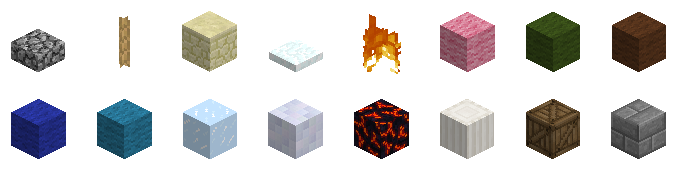
Used to add support for custom block types. Custom block IDs start at 50 (0x32). New block types will be added in batches, a few at a time. Both client and server declare which batch they support, and use the lower of the two versions. Claiming to support a batch implies fully implementing all the batches that came before it. If either server or client do not support this extension, only the standard 50 block types should be used.
Motivation: Adding new visually distinct blocks, to enhance Classic players' experience.
Client behavior: Client must expect a CustomBlockSupportLevel packet from a compatible server immediately after sending the last ExtEntry packet. It should then reply with its own CustomBlockSupportLevel packet, containing its actual support level. Client must then use the lower of the two levels in operation. Client must not send any block types that are not defined by the current support level. Client should expect ServerIdentification packet only AFTER sending its CustomBlockSupportLevel packet.
Server behavior: Server must send a CustomBlockSupportLevel packet to compatible clients immediately after receiving the last ExtEntry packet from the client. It should then wait to receive a CustomBlockSupportLevel packet from the client before sending the ServerIdentification packet. Server must then use the lower of the two levels in operation. If this level is lower than the server's, it has to filter data sent to the client, to make sure that the client never receives any block types that it does not support. Each level will define what substitutions to use.
CustomBlockSupportLevel packet
Bidirectional
Packet ID |
Field Name |
Field Type |
Example |
Notes |
|---|---|---|---|---|
0x13 (19) |
SupportLevel |
byte |
1 |
|
Total Size: |
2 |
|||
Blocks in support level 1
Client must be able to receive/render all 16 custom blocks to claim support. Server must be able to receive/store all 16 custom blocks to claim support.
Block name |
Block ID |
Fallback name |
Fallback ID |
|---|---|---|---|
CobblestoneSlab |
0x32 (50) |
Slab |
0x2C (44) |
Rope |
0x33 (51) |
BrownMushroom |
0x27 (39) |
Sandstone |
0x34 (52) |
Sand |
0x0C (12) |
Snow |
0x35 (53) |
Air |
0x00 (0) |
Fire |
0x36 (54) |
Lava |
0x0A (10) |
LightPinkWool |
0x37 (55) |
Pink |
0x21 (33) |
ForestGreenWool |
0x38 (56) |
Green |
0x19 (25) |
BrownWool |
0x39 (57) |
Dirt |
0x03 (3) |
DeepBlue |
0x3A (58) |
Blue |
0x1d (29) |
Turquoise |
0x3B (59) |
Cyan |
0x1c (28) |
Ice |
0x3C (60) |
Glass |
0x14 (20) |
CeramicTile |
0x3D (61) |
Iron |
0x2a (42) |
Magma |
0x3E (62) |
Obsidian |
0x31 (49) |
Pillar |
0x3F (63) |
White |
0x24 (36) |
Crate |
0x40 (64) |
WoodenPlanks |
0x05 (5) |
StoneBrick |
0x41 (65) |
Stone |
0x01 (1) |
Block IDs for future support levels are guaranteed to be assigned monotonically, incrementally, and permanently.
Provides a way for the client to notify the server about the blocktype that it is currently holding, and for the server to change the currently-held block type.
Motivation: This allows server to know which block player is holding, for example for drawing commands, without needing to wait for the player's click. It also allows for features like /Spectate to show what block a spectated player is holding.
Client behavior: When this extension is mutually supported, client should use the PlayerID field of the PositionAndOrientation packet (currently unused) to indicate which blocktype the client is currently holding. It should be ready to accept HoldThis packets to change the block that the player is holding. If an unrecognized blocktype is given, no action is needed.
Server behavior: The server can use HoldThis packet to force the client to hold the desired block type. It should be done sparingly.
HoldThis packet
Server to Client
Packet ID |
Field Name |
Field Type |
Example |
Notes |
|---|---|---|---|---|
0x14 (20) |
BlockToHold |
byte |
|
Standard block type |
PreventChange |
byte |
0 |
0 = Allow player to change blocktype 1 = Prevent player from changing blocktype |
|
Total Size: |
3 bytes |
|||
This extension indicates that the client can render emotes (ASCII control characters) in chat properly, without padding or suffixes that are required for vanilla client. This extension does not define any new packets.
Motivation: To improve appearance of emotes in chat.
Client behavior: Client should not emulate vanilla client's quirks.
Server behavior: Server should not pad or suffix emotes in chat.
This extension allows the server to define "hotkeys" for certain commands.
Motivation: To speed up and simplify access to commonly-used commands and command macros by providing server-defined client-side hotkeys.
Client behavior: Client should not try to persist
previously-defined hotkeys between sessions. When a defined hotkey is
activated by the user, client should open up a text prompt and type in
contents of the Action field. A newline character
(\n) in the Action field indicates that whatever
is currently typed-in should be sent to the server. If Action
does not end with a newline, text prompt should be left open, for the
user to complete. Client may provide a way for the user to see a list of
currently-defined hotkeys, and a way to notify the user when a hotkey
was activated.
Server behavior: The server should send a definition of each hotkey (SetTextHotKey packet) once per connection.
SetTextHotKey packet
Server to Client
Packet ID |
Field Name |
Field Type |
Example |
Notes |
|---|---|---|---|---|
0x15 (21) |
Label |
string |
|
Readable name of the hotkey |
Action |
string |
|
Text to type in |
|
KeyCode |
int |
|
LWJGL keycode of the key |
|
KeyMods |
byte |
|
Key modifier flags, may be combined:
|
|
Total Size: |
134 bytes |
|||
Motivation: Provides more flexibility in naming of players and loading of skins, autocompletion, and player tab-list display. Separates tracking of in-game entities (spawned player models) and names on the player list. ExtAddPlayerName/ExtRemovePlayerName packets take over managing the player names list (tab-list), and ExtAddEntity2/DespawnPlayer packets are used only to manage in-game entities.
This version of the extension has been deprecated and replaced with version 2.
Version 2 of this extension replaces ExtAddEntity packet with ExtAddEntity2, allows using full URLs for SkinName, and clarifies interaction with ChangeModel extension.
Client Behavior
When ExtAddPlayerName packet is received for an unrecognized NameID, a new name must be added to the player-name list. When receiving ExtAddPlayerName packet for an already-listed NameID, client must update its ListName, GroupName, and GroupRank. Player-name list must persist when client changes worlds/maps.
When an ExtAddEntity2 packet is received, it must be treated as the SpawnPlayer packet. A player model must be spawned in-game at the given location, with InGameName text drawn above it. Skin should be loaded using the given SkinName for a player name. When client receives ExtAddEntity2 packet for an already-spawned player, a duplicate entity must not be spawned and existing entity's position must not be changed. Instead their InGameName and SkinName must be updated. If a negative EntityID is given for ExtAddEntity2, client must update player's own spawn point, InGameName, and SkinName. The client must ignore regular SpawnPlayer packets, if any are received.
Player entity's skin should be loaded using the given
SkinName. If SkinName appears to be a player name,
skin should be downloaded from the default skin server. If
SkinName appears to be a full URL to a PNG image (starts with
http:// or https:// and ends with
.png) then skin should be downloaded from that URL. If
image is correctly sized/proportioned to use as a skin for the current
model, it should be used. If a blank or unrecognized value is given for
SkinName, or if given image could not be downloaded or used,
then the default skin should be used.
Names on the player-name list should be grouped by GroupName in the player-name list. Names within a GroupName should be sorted by GroupRank (in ascending order). Names with the same GroupName and GroupRank should be sorted alphabetically by ListName. Color codes may be either drawn or stripped from ListName, GroupName, and InGameName.
When a standard DespawnPlayer packet is received for a recognized EntityID, player model must be removed from a world. When ExtRemovePlayerName packet is received for a recognized NameID, their name must be removed from player-name list. Packets with out-of-range or unrecognized NameIDs must be ignored.
In-game entities must never be affected by ExtAddPlayerName or ExtRemovePlayerName packets. Player name list must never be affected by ExtAddEntity2 or DespawnPlayer packets.
Server Behavior
Event |
Packet to send |
|---|---|
Player connects to server |
ExtAddPlayerName |
Player enters map |
ExtAddEntity2 |
Player leaves map |
DespawnPlayer |
Player disconnects from server |
ExtRemovePlayerName |
Unique NameID between 0 and 255 should be assigned to every online player. When a new player connects to the server, ExtAddPlayerName must be sent. GroupName and GroupRank can be used in any way, for example to group players by map/world or rank/class/faction. Server must use ExtAddEntity2 in place of standard SpawnPlayer packet. Server should re-send ExtAddPlayerName packet, using the identical NameID, when player's ListName, GroupName, or GroupRank change. Server must reliably send an ExtRemovePlayerName packet when the player disconnects. Color codes are permitted in ListName, GroupName, and InGameName.
ExtAddPlayerName packet
Server to Client
Packet ID |
Field Name |
Field Type |
Example |
Notes |
|---|---|---|---|---|
0x16 (22) |
NameID |
short |
|
Between 0 and 255 |
PlayerName |
string |
|
Player name used for autocompletion. May be left empty (to exclude from autocompletion). |
|
ListName |
string |
|
Name displayed in the in-game list. |
|
GroupName |
string |
|
May be left blank. |
|
GroupRank |
byte |
|
Rank of a player within the group. Lower-number ranks are listed before higher-number ranks. |
|
Total Size: |
196 bytes |
|||
ExtAddEntity2 packet
Server to Client
Packet ID |
Field Name |
Field Type |
Example |
Notes |
|---|---|---|---|---|
0x21 (33) |
EntityID |
byte |
|
Between 0 and 127 |
InGameName |
string |
|
Player name to be shown in-game, hovering above player model. |
|
SkinName |
string |
|
Player name whose skin should be used by the client. |
|
SpawnX |
short |
|
X coordinate (32 units per block) of entity's spawn location. |
|
SpawnY |
short |
|
Y coordinate (32 units per block) of entity's spawn location. |
|
SpawnZ |
short |
|
Z coordinate (32 units per block) of entity's spawn location. |
|
SpawnYaw |
byte |
|
Orientation (left-right) at the entity's spawn location. |
|
SpawnPitch |
byte |
|
Orientation (up-down) at the entity's spawn location. |
|
Total Size: |
138 bytes |
|||
ExtRemovePlayerName packet
Server to Client
Packet ID |
Field Name |
Field Type |
Example |
Notes |
|---|---|---|---|---|
0x18 (24) |
NameID |
short |
|
Between 0 and 255 Matches NameID of the ExtAddPlayerName packet |
Total Size: |
3 bytes |
|||
This extension allows server to alter some of the colors used by the client in environment rendering.
Motivation: To allow the server to give worlds/maps a unique feel: time-of-day, weather/climate, lighting effect, etc.
Client behavior: Client must check for
EnvSetColor packets right before LevelFinalize
packet, and apply these changes before the map is displayed. Client must
be able to read this packet at other times, but it is not required to
then apply the changes immediately. If an unrecognized or unsupported
Variable field is given, no action is needed. If an
out-of-range color is given by the server (i.e. if any of Red,
Green, or Blue is less than 0 or greater
than 255), then the specified Variable should be
reset to its default value.
Server behavior: Server should normally only use
EnvSetColor packets right before the LevelFinalize
packet. To reset a variable to its default value, the server should send
a packet with value -1 for Red, Green,
and Blue.
EnvSetColor packet
Server to Client
Packet ID |
Field Name |
Field Type |
Example |
Notes |
|---|---|---|---|---|
0x19 (25) |
Variable |
byte |
|
Enumeration of environmental variables
|
Red |
short |
|
Between 0 and 255 |
|
Green |
short |
|
Between 0 and 255 |
|
Blue |
short |
|
Between 0 and 255 |
|
Total Size: |
8 bytes |
|||
Motivation: Allows the server to highlight parts of a world. Applications include zoning, previewing draw commands, previewing undo commands.
Coordinates: {StartX,StartY,StartZ} are coordinates of the block inside the selection that is closest to the map origin. {EndX,EndY,EndZ} are coordinates of the block inside the selection that is furthest from the map origin. Therefore, the resulting selection has dimensions {EndX-StartX+1, EndY-StartY+1, EndZ-StartZ+1).
Client behavior: Client should be ready to receive MakeSelection packets any time after LevelFinalize packet. Upon receiving the packet, a translucent cuboid should appear in the world. The cuboid may feature a plain or "grid" texture. Selections that extend outside the map may be either ignored or clipped to fit. Selections with inconsistent coordinates (e.g. where StartX<EndX) may either be ignored or re-ordered. Out-of-range values for Red, Green, Blue, and Opacity should be clipped to fit the valid range. Supporting Opacity is optional: the client may opt to provide fixed opacity instead. When map changes (i.e. when LevelInitialize packet is received), all existing selections should be removed. RemoveSelection packets that refer to non-existent SelectionIDs should be ignored.
Server behavior: All given coordinates must be contained within the map. End coordinates should be higher or equal than start coordinates.
MakeSelection packet
Server to Client
Packet ID |
Field Name |
Field Type |
Example |
Notes |
|---|---|---|---|---|
0x1A (26) |
SelectionID |
byte |
|
Numeric ID of the selection. Between 0 and 127. |
Label |
string |
|
Text label associated with the selection |
|
StartX |
short |
|
X coordinate of the starting point |
|
StartY |
short |
|
Y coordinate of the starting point |
|
StartZ |
short |
|
Z coordinate of the starting point |
|
EndX |
short |
|
X coordinate of the ending point |
|
EndY |
short |
|
Y coordinate of the ending point |
|
EndZ |
short |
|
Z coordinate of the ending point |
|
Red |
short |
|
Between 0 and 255. |
|
Green |
short |
|
Between 0 and 255. |
|
Blue |
short |
|
Between 0 and 255. |
|
Opacity |
short |
|
0 = fully transparent 255 = fully opaque |
|
Total Size: |
86 bytes |
|||
RemoveSelection packet
Server to Client
Packet ID |
Field Name |
Field Type |
Example |
Notes |
|---|---|---|---|---|
0x1B (27) |
SelectionID |
byte |
|
|
Total Size: |
2 bytes |
|||
This extension allows the server to instruct the player that certain block types are allowed/disallowed to be placed or deleted.
Motivation: To prevent players from inadvertently placing or removing prohibited block types (e.g. water, lava, grass, admincrete), before it even reaches the server.
Client behavior: Client should prevent placement of
prohibited block types (by graying out or hiding blocks in
block-selection screen, or any other effective means). Client should
prevent player from deleting prohibited block types. Client must be
ready to receive SetBlockPermission packet after map
load (LevelFinalize
packet). Permission changes should take effect as soon as packet is
received. Admincrete (solid block) permissions set by
SetBlockPermission must always override permission set
by ServerIdentification
and UpdateUserType
packets. If BlockType is set to 0, the client
behaviour is undefined. Permissions must persist between map changes.
Client may optionally warn the player attempting to place/delete
prohibited blocks via sound effect, visual effect, chat message,
etc.
Server behavior: Server may send SetBlockPermission packets any time after map load (LevelFinalize packet). Any valid block ID may be specified for BlockType, including custom blocks (if CustomBlocks extension is mutually supported). Server must not assume that client is compliant/obedient, and server must still verify each SetBlock packet coming from the client. What to do with non-complying clients (kick or warn) is up to you.
SetBlockPermission packet
Server to Client
Packet ID |
Field Name |
Field Type |
Example |
Notes |
|---|---|---|---|---|
0x1C (28) |
BlockType |
byte |
|
Block's numeric ID (anything between 1 and max defined block). |
AllowPlacement |
byte |
|
0 = Prohibited 1 or any other value = Allowed |
|
AllowDeletion |
byte |
|
0 = Prohibited 1 or any other value = Allowed |
|
Total Size: |
4 bytes |
|||
Allows changing appearance of player models in supporting clients.
Client Behavior
The client will receive an EntityID and a string value
containing the model name. The client will then change the model of the
player whose ID is the same as the received AddEntity,
ExtAddEntity, or ExtAddEntity2 packet.
The model name will be parsed by the model manager and the model changed
in game. If the model does not exists in the model manager or is
0-length, change the model back to humanoid. Alternatively, you can send
the client an int converted to a string which represents a valid Block
ID. An EntityID of -1 (255 unsigned) indicates the player's own
model. If model is set to humanoid, player-specific skin
should be used. For all other models, default model-specific textures
should be used.
Server Behavior
The server may send an EntityID and then a
ModelName to the client for a desired entity. The model name
must be chosen from the list below. To reset the model to default,
server should set ModelName to humanoid or to an
empty string.
Interaction with ExtPlayerList
If an ExtAddEntity2 packet is received for a
non-humanoid entity and SkinName specifies a full
URL, that image should be downloaded and used as a texture for the
currently model. Receiving another ExtAddEntity2 packet
should either update this texture (if SkinName is a full URL)
or reset it back to default (if SkinName is anything else).
Receiving another ChangeModel packet with a
non-humanoid ModelName should reset texture back
to model-specific default.
ChangeModel packet
Packet ID |
Field Name |
Field Type |
Example |
Notes |
|---|---|---|---|---|
0x1D (29) |
EntityID |
byte |
5 |
Between 0 and 127. |
ModelName |
string |
|
The name of the model to be used OR a valid Block ID as a string. |
|
Total Size: |
66 bytes |
|||
Available models
Client can render any or none of the below, but it is down to the client to handle what can and cannot be rendered if the packet is received
Model Name |
Model String |
|---|---|
Chicken |
|
Block Model |
A valid block ID as a string |
Creeper |
|
Crocodile |
|
Humanoid |
|
Pig |
|
Printer |
|
Sheep |
|
Skeleton Archer |
|
Spider |
|
Zombie |
|
Head |
|
Sitting |
|
Chibi |
|
This extension allows the server to specify custom terrain textures, and tweak appearance of map edges.
Motivation: To provide more ways to customize map appearance, including functionality that's currently provided by World of Minecraft's scheme.
All versions of this extension have been deprecated and replaced with EnvMapAspect.
This extension allows the server to trigger special weather conditions (like rain and snow) on demand.
Motivation: To allow the server to give worlds/maps a unique feel with weather effects, e.g. for adventure maps.
Client behavior: Client must be able to receive EnvWeather packets at any time after the first LevelDataChunk packet is received, and apply these changes immediately. If an unrecognized or unsupported WeatherType field is given, no action is needed.
Server behavior: Server may send EnvSetColor packets to connected clients at any time after the first LevelDataChunk packet is sent.
EnvSetWeatherType packet
Server to Client
Packet ID |
Field Name |
Field Type |
Example |
Notes |
|---|---|---|---|---|
0x1F (31) |
WeatherType |
byte |
|
Enumeration of weather types
|
Total Size: |
2 bytes |
|||
This extension allows the server to control cheats/hacks in the client.
Motivation: To allow fine-grained control over cheats/hacks on multi-world servers.
Client behavior: Client must be able to receive
HackControl packets at any time after the first
LevelDataChunk
packet is received, and apply these changes immediately. Unrecognized or
unsupported values for any field should be ignored. Clients may
approximate JumpHeight by rounding down to the nearest
half-block (i.e. nearest multiple of 16), if needed. If a negative value
is given for JumpHeight, client should reset jump height to its
default setting (around 40 in vanilla Minecraft).
Server behavior: Server may send HackControl packets to connected clients at any time after the first LevelDataChunk packet is sent.
HackControl packet
Server to Client
Packet ID |
Field Name |
Field Type |
Example |
Notes |
|---|---|---|---|---|
0x20 (32) |
Flying |
byte |
|
|
NoClip |
byte |
|
|
|
Speeding |
byte |
|
|
|
SpawnControl |
byte |
|
|
|
ThirdPersonView |
byte |
|
|
|
JumpHeight |
short |
|
Maximum height, in terms of player movement units
(1/32nds of a block), to which the player is allowed to jump.
Negative value (e.g. |
|
Total Size: |
8 bytes |
|||
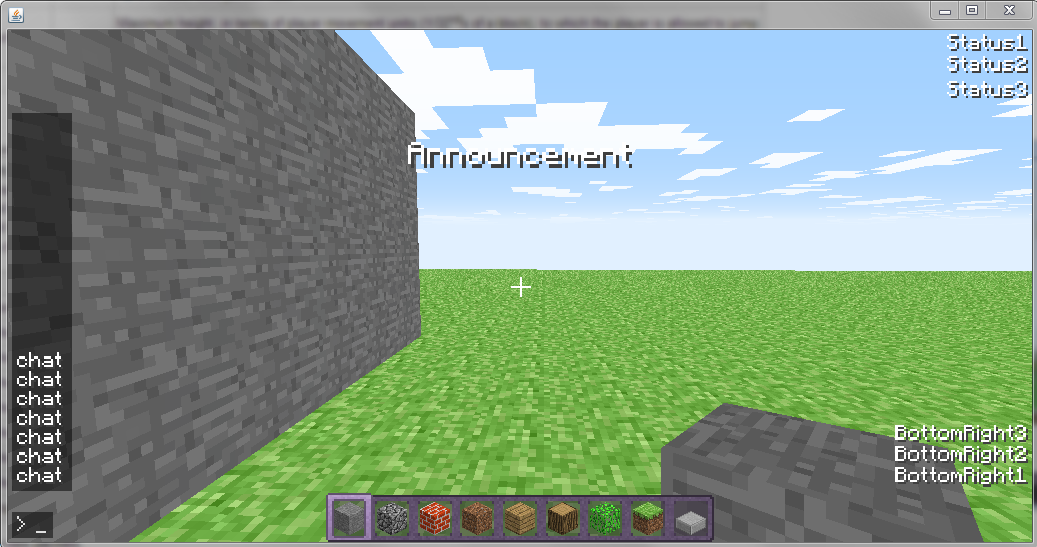
This extension adds new ways of presenting messages in the client.
Motivation: To enhance the display of announcements and status information, and to reduce chat clutter.
Client behavior: When this extension is mutually supported, the PlayerID field of the standard server-to-client Message packet should be treated as a MessageType code. Unrecognized or unsupported codes may be ignored (in which case the message should be presented as a regular chat message). When connected to non-supporting servers, this field should be ignored.
Server behavior: Server may use the
PlayerID field of the Message
packet to set a MessageType. For non-supporting clients, this
field should always be set to 0.
MessageType |
Meaning |
Suggested Implementation |
|---|---|---|
|
Chat |
Normal message, shown in the chat area. |
|
Status1 |
Shown persistently in the top-right corner of the screen, in regular font. |
|
Status2 |
Shown persistently just below Status1 |
|
Status3 |
Shown persistently just below Status2 |
|
BottomRight1 |
Shown persistently in the bottom-right corner of the screen, in regular font. |
|
BottomRight2 |
Shown persistently just above BottomRight1 |
|
BottomRight3 |
Shown persistently just above BottomRight2 |
|
Announcement |
Pops up in larger font near the top-center of the screen. Fades out after a few seconds. |
This extension does not define any new packets.
This extension lets the server receive details of every mouse click a player makes, including targeting information.
Motivation: To allow for the creation of more interactive maps: interactive buttons, cannons, ability to "tag" or "shoot" other players, ability to drag-to-draw at a distance, etc.
Client Behavior: When this extension is mutually supported, a PlayerClicked packet should be sent to the server, as soon as reasonably possible, every time the user presses or releases a mouse button. Mouse interactions that happen while player is interacting with chat, with GUI menus, or with any other application must NOT be sent. A matching "released" event must be sent for every "pressed" event.
High resolution up-to-date Yaw and Pitch for the player should be transmitted with every packet. If player is currently targeting another entity/player TargetEntityID fields should be set. If player is currently targeting a block (within permitted ClickDistance) TargetBlockX, TargetBlockY, TargetBlockZ, and TargetBlockFace should be set. An out-of-range value should be used for these fields when they are not in use. These packets should not be sent during level transitions (after receiving LevelInitialize and until receiving LevelFinalize packets).
Server Behavior: Server must be ready to accept any number of PlayerClicked packets at any time after level sending has completed. What to do with this information is entirely up to the server.
PlayerClicked packet
Client to Server
Packet ID |
Field Name |
Field Type |
Example |
Notes |
|---|---|---|---|---|
0x22 (34) |
Button |
byte |
0 |
0 = Left click, 1 = Right Click, 2 = Middle click |
Action |
byte |
0 |
0 = Pressed, 1 = Released |
|
Yaw |
short |
0 |
Yaw (heading) of the player. Same function as Yaw field of PositionAndOrientation packet, but with more precision. |
|
Pitch |
short |
0 |
Pitch (head angle) of the player. Same function as Pitch field of PositionAndOrientation packet, but with more precision. |
|
TargetEntityID |
byte |
0 |
ID of an entity currently targeted by the player, between 0 and 127. Any out-of-range value means "no entity is targeted." |
|
TargetBlockX |
short |
64 |
X coordinate of a targeted block, between 0 and 2048. Any out-of-range value for any of the coordinates means "no block is targeted." |
|
TargetBlockY |
short |
64 |
Y coordinate of a targeted block, between 0 and 2048. |
|
TargetBlockZ |
short |
64 |
Z coordinate of a targeted block, between 0 and 2048. |
|
TargetBlockFace |
byte |
1 |
Index of the block face that the player is targeting. Block faces are numbered as follows: 0. Away from X-origin 1. Towards X-origin 2. Away from Y-origin (up) 3. Towards Y-origin (down) 4. Away from Z-origin 5. Towards Z-origin Any out-of-range value for TargetBlockFace mean "no block is targeted." |
|
Total Size: |
15 bytes |
|||
This extension allows clients to accept messages longer than 64 characters, and send them to the server in parts.
Motivation: To allow players to write longer messages!
Client Behavior: When a regular-length message is
sent, a single Message
packet is sent, with the unused PlayerID (aka
MessageType) byte set to 0. When an extra-long
message is sent, multiple Message
packets are sent. All packets except the last one should have the unused
byte set to 1, meaning "this message continues in the next
Message packet".
Server Behavior: Server should check the unused
PlayerID (aka MessageType) byte of every incoming Message
packet. If the value is non-zero, it should treat it as a partial
message. Partial messages should be stored and prepended to the next
message received from this player, until a message with a 0
byte is received. Server should preserve leading and trailing whitespace
in message packets with a 1 byte. Server should preserve
leading whitespace, but trim trailing whitespace from the last packet of
a partial message.
No new packets are defined, but treatment of Message packet is altered.
This extension allows players to send and receive chat with all characters in code page 437, rather than just the 0 to 127 characters.
Motivation: To allow players to use more characters for different purposes.
Client Behavior: When a message packet is received, clients must treat all characters in that message as unsigned bytes that represent indices into code page 437. Clients may optionally provide a way of directly entering code page 437 characters into chat.
Server Behavior: Servers must support being able to send and receive chat message packets which include unsigned byte values ranging from 0 to 255. Servers must also provide a fallback mechanism for converting unsigned bytes in the 128-255 range into the 0 to 127 range for clients that do not support this extension. (e.g converting all unsigned bytes in the 128 to 255 range to a '?' symbol)
Note: Ideally, servers should also provide some method of escaping that allows users to enter a token that is then converted into a code page 437 index, but that is not required to claim support for this extension.
As an example of an escaping mechanism, when "{infinity}" is entered by the player, it becomes a single unsigned byte with a value of '236' after being processed by the server. When the chat message packet is later received by the client, it renders the unsigned byte with the value of '236' as ∞.
This extension allows servers to define new block types with custom IDs and appearance, as well as the ability to redefine the properties of standard block types.
Motivation: To allow defining block types without client modifications. To make full use of custom textures.
Client Behavior: Client must be able to receive any number of DefineBlock and RemoveBlockDefinition packets at any time. Servers should prefer to send these packets during level loading (after sending LevelInitialize and before sending LevelFinalize), as sending these after level loading may cause the client to perform expensive operations such as redrawing the map. Client must keep track of all defined blocks between level changes or until they are individually removed with RemoveBlockDefinition.
Client must be able to accept and render blocks as specified in DefineBlock packets. Clients must accept any valid definitions with BlockID between 1 and 255, inclusive. If a new definition is accepted for an already-defined BlockID, the old definition should be replaced. If RemoveBlockDefinition is received for a non-defined BlockID, it should be ignored. Otherwise, the properties of that block should be reset to their defaults.
Server Behavior: Server may send any number of DefineBlock packets at any time. Server should only use IDs of currently-defined blocks in block data sent in LevelDataChunk packets, SetBlock packets, or any other packets that expect block IDs.
Texturing: New textures are defined by altering
terrain.png and specifying it with SetMapEnvUrl
packet. DefineBlock fields TopTextureID,
SideTextureID, and BottomTextureID refer to a tile
number within terrain.png. Tiles are numbered 0 (top-left
corner) through 255 (bottom-right corner), increasing left-to-right
within each row. Refer to this
image for a list of standard tiles, and a graphical list of tile
indices.
Compatibility: For non-supporting clients, the server must convert custom block ids into fallback block ids (e.g. 'lamp' fallbacks to lava) that lie within the client's set of supported blocks. (TODO: Define how the client should store map files with block definitions. Maybe integrate this with ClassicWorld definition?) 0 is not allowed to be redefined.
DefineBlock packet
Server to Client
Packet ID |
Field Name |
Field Type |
Example |
Notes |
|---|---|---|---|---|
0x23 (35) |
BlockID |
byte |
|
Between 1 and 255 (unsigned). |
Name |
String |
|
Short, unique, player-friendly name for the block. |
|
Solidity |
byte |
|
Specified collision mode for this block type.
|
|
MovementSpeed |
byte |
|
Player movement speed modifier, defined relative to regular walk
speed. Ratio to normal speed is computed with this formula: y =
2(x-128)/64 Thus a value of
If player is affected by several tiles, the lowest of all modifiers is used. |
|
TopTextureID |
byte |
|
Refers to a |
|
SideTextureID |
byte |
|
Refers to a |
|
BottomTextureID |
byte |
|
Refers to a |
|
TransmitsLight |
byte |
|
Whether this block allows the sunlight to go through, for level-lighting purposes. |
|
WalkSound |
byte |
|
ID of a sound that client may play when player "steps" on, "walks" through, or "swims" through this tile. 0 = no sound, 1 = wood, 2 = gravel, 3 = grass, 4 = stone, 5 = metal, 6 = glass, 7 = wool, 8 = sand, 9 = snow. |
|
FullBright |
byte |
|
Whether or not the block/liquid is affected by shadows (such as lava).
|
|
Shape |
byte |
|
Shape of the block model:
(e.g. slab would have a shape of '8', snow would have '2', dirt would have '16') |
|
BlockDraw |
byte |
|
Can be:
|
|
FogDensity |
byte |
|
Density of fog while client's camera is inside this block. Value
of GL_FOG_DENSITY = (x+1)/128 Thus value of |
|
FogR |
byte |
|
Red component of the aforementioned fog. Only applies if
FogDensity is above |
|
FogG |
byte |
|
Green component of the aforementioned fog. Only applies if
FogDensity is above |
|
FogB |
byte |
|
Blue component of the aforementioned fog. Only applies if
FogDensity is above |
|
Total Size: |
80 bytes |
|||
RemoveBlockDefinition packet
Server to Client
Packet ID |
Field Name |
Field Type |
Example |
Notes |
|---|---|---|---|---|
0x24 (36) |
BlockID |
byte |
|
Between 128 and 255 |
Total Size: |
2 bytes |
|||
This extension allows servers to define new block types with custom IDs and appearance, as well as the ability to redefine the properties of standard block types.
Motivation: To allow defining custom block types that do not have minX/Y/Z values of 0, and maxX/Z values of 1.
Client Behavior: See the BlockDefinitions specification. This extension depends on BlockDefinitions extension, and must only be enabled if that extension is also mutually supported.
This version of the extension has been deprecated and replaced with version 2.
Texturing: See the BlockDefinitions specification. The MinX/Y/Z and MaxX/Y/Z fields also affect the location within the terrain tile for a given face that the block should sample texels from. (e.g. if minX and minZ was 8, and maxX and maxZ was 16, then for the terrain.png tile with pixels from (0, 0) to (16, 16), the top face would be drawn with the subset of pixels from (8, 8) to (16, 16))
Server Behavior: See the BlockDefinitions specification.
This packet is the same as DefineBlock packet, except the 'shape field' is replaced by 6 fields indicating the bounding box of the block in pixel coordinates, and the 'side texture' is replaced by 4 fields indicating the individual textures for each horizontal side face. Note that this packet does not support sprites, you must send a regular DefineBlock packet for that.
DefineBlockExt packet
Server to Client
Packet ID |
Field Name |
Field Type |
Example |
Notes |
|---|---|---|---|---|
0x25 (37) |
Following fields from DefineBlock packet: BlockID, Name, Solidity, MovementSpeed, TopTextureID |
|||
LeftTextureId |
byte |
|
Refers to a terrain.png tile. Between 0 and 255 (unsigned). Can be same as other texture IDs. This is the texture ID for the X = 0 face. |
|
RightTextureId |
byte |
|
Refers to a terrain.png tile. Between 0 and 255 (unsigned). Can be same as other texture IDs. This is the texture ID for the X = 1 face. |
|
FrontTextureId |
byte |
|
Refers to a terrain.png tile. Between 0 and 255 (unsigned). Can be same as other texture IDs. This is the texture ID for the Z = 0 face. |
|
BackTextureId |
byte |
|
Refers to a terrain.png tile. Between 0 and 255 (unsigned). Can be same as other texture IDs. This is the texture ID for the Z = 1 face. |
|
Following fields from DefineBlock packet: BottomTextureID, TransmitsLight, WalkSound, FullBright |
||||
MinX |
byte |
|
Minimum X coordinate in pixels. Min allowed is 0, max allowed is 15. |
|
MinY |
byte |
|
Minimum Y coordinate in pixels. Min allowed is 0, max allowed is 15. |
|
MinZ |
byte |
|
Minimum Z coordinate in pixels. Min allowed is 0, max allowed is 15. |
|
MaxX |
byte |
|
Maximum X coordinate in pixels. Min allowed is 1, max allowed is 16. |
|
MaxY |
byte |
|
Maximum Y coordinate in pixels. Min allowed is 1, max allowed is 16. |
|
MaxZ |
byte |
|
Maximum Z coordinate in pixels. Min allowed is 1, max allowed is 16. |
|
Following fields from DefineBlock packet: BlockDraw, FogDensity, FogR, FogG, FogB |
||||
Total Size: |
88 bytes |
|||
Allows servers to send a single optimised packet that contains 256 block updates.
Motivation: Reduce bandwidth usage and increase responsiveness to clients during times of heavy block updates, e.g. for large cuboids or lava survival servers.
Client Behavior: When this extension is mutually supported, treat the packet in the same manner as a list of up to 256 SetBlock packets.
Server Behavior: When this extension is mutually supported, server may send BlockBulkUpdate packets to the client after the LevelFinalize packet for the current level has been sent to the client.
BulkBlockUpdate packet
Server to Client
Packet ID |
Field Name |
Field Type |
Example |
Notes |
|---|---|---|---|---|
0x26 (38) |
Count |
unsigned byte |
|
The number of block updates used in this packet - 1. (e.g. a value of 0 means 1 block update is used). |
Indices |
byte array[1024] |
[52, 3443] |
A packed list of the indices within the current level of the blocks that are to be updated. Each element is a 32 bit integer in big endian order. |
|
Blocks |
byte array[256] |
[5, 10] |
A packed list of the new blocks to set at each corresponding index in the indices array. |
|
Total Size: |
1282 bytes |
|||
This extension allows the server to define custom text colors.
Motivation: To allow parts of chat to be more distinctive, allow for more colorful chat, etc.
Client Behavior: Client must be able to receive SetTextColor packets at any time. Client must then draw text using the color specified in the packet, when the color code specified by the packet is encountered in any Message packet.
An alpha/opacity of 0 is treated as removing the custom colour code from the client's list of custom color codes.
Server Behavior: Server may send SetTextColor packets at any time.
Compatibility: Clients may choose to always draw text fully opaque, even if the custom text colour specifies a non fully-opaque color. These clients shall still be considered as compliant with the specification.
For maximum compatibility, it is recommended that the color code in the SetTextColor be greater than 0x20(space) and less than 0x7F(delete). The color code must not be '&', '%', ' ', or '\0'.
Clients may support overriding /replacing the standard hex color codes, when the code in the range 0-9, a-f, or A-F.
SetTextColor packet
Server to client
Packet ID |
Field Name |
Field Type |
Example |
Notes |
|---|---|---|---|---|
0x27 (39) |
Red |
unsigned byte |
|
Red component of the text color. |
Green |
unsigned byte |
|
Green component of the text color. |
|
Blue |
unsigned byte |
|
Blue component of the text color. |
|
Alpha |
unsigned byte |
|
Alpha/Opacity of the text colour, with 255 being fully opaque. |
|
Code |
unsigned byte |
|
ASCII character colour code, case sensitive. |
|
Total Size: |
6 bytes |
|||
Example: Suppose the server sends a SetTextColor packet of color #123456 and color code 'G'. When the client receives a Message packet with the text &fFoo&GBar, Foo is drawn using the color #FFFFFF and Bar is drawn using the color #123456.
This extension allows the server to specify custom texture packs, and tweak appearance of a map.
Client behavior: Client must be able to receive SetMapEnvUrl and SetMapEnvProperty packets at any time after the LevelInitalise packet is received for a level. If the TexturePackURL field in a SetMapEnvUrl packet is blank or if the given file could not be loaded for any reason, then the texture pack should be reset to the client's default. If an unsupported block ID is given for SideBlock or EdgeBlock, it should be ignored. Client should keep using the texture pack for future maps, unless specified otherwise by the server.
Server behavior: Server may send SetMapEnvUrl and SetMapEnvProperty packets after the LevelInitalise packet is sent for a level. Server should not use any custom block IDs unless the client declared the appropriate CustomBlocks support level. To reset the texture pack to the client's default one, server should send an SetMapEnvUrl packet with empty string for TexturePackURL. To reset other properties, server should simply use the default values (listed below).
Block type restrictions: Only solid blocks are allowed to be used for SideBlock and EdgeBlock properties. Sprites (Sapling, Dandelion, Rose, BrownMushroom, RedMushroom, Rope, Fire) partial-height blocks (Slab, CobblestoneSlab, Snow), and transparent blocks (Air, Leaves, Glass) cannot be used for those fields.
SetMapEnvUrl packet
Server to Client
Packet ID |
Field Name |
Field Type |
Example |
Notes |
|---|---|---|---|---|
0x28 (40) |
TexturePackURL |
string |
Texture pack's full URL. Must be a HTTP/HTTPS URL,
in .zip format, and served with |
|
Total Size: |
65 bytes |
|||
Texture pack .zip format
Note: It is up to clients which files (except for terrain.png) they support in a texture pack. These clients are still considered to be compliant with the specification.
Note: Texture packs may also contain other files not listed below. If clients recognise these other files, then they may perform whatever is desired with them.
Note: If a texture pack does not contain a certain texture, clients should continue to use the existing texture from the previous texture pack.
File name |
Details |
|---|---|
terrain.png |
Texture atlas that contains the textures that are applied to blocks. Note: Clients must support this texture to be considered compliant with the specification. |
animations.png |
Texture atlas that contains the textures used for animations. |
animations.txt |
File that specifies how the textures in animations.png should be applied to the terrain.png texture atlas. |
char.png |
Default skin for humanoid models. |
clouds.png |
Texture applied to clouds rendered by the client. |
The following may be utilised by clients if EnvWeatherType is mutually supported: |
|
rain.png |
Texture applied to rain rendered by the client. |
snow.png |
Texture applied to snow rendered by the client. |
The following may be utilised by clients if ChangeModel is mutually supported: Note: The default texture for humanoid models is specified by char.png. Block models use textures from terrain.png. |
|
x.png |
Default texture applied to a model for model string x. For example, the Crocodile model has the model string croc. The default texture that would be applied is specified by croc.png. |
animations.txt format
Each line is in the format: - FrameX and FrameY indicates the pixel coordinates of the first animation frame in animations.png. The top left pixel coordinate is (0, 0) - Frame size indicates the size in pixels of an animation frame. - Frames count indicates the number of used frames. The first frame is located at (FrameX, FrameY), second frame at (FrameX + FrameSize, FrameY) and so forth. - Tick delay is the number of ticks a frame doesn't change. For instance, a value of 0 means that the frame would be changed every tick, while a value of 2 would mean 'replace with frame 1, don't change frame, don't change frame, replace with frame 2'. |
SetMapEnvProperty packet
Server to Client
Packet ID |
Field Name |
Field Type |
Example |
Notes |
|---|---|---|---|---|
0x29 (41) |
Property type |
byte |
|
Enumeration of properties that can be changed
|
Property value |
int |
45 |
New value for the given property. |
|
Total Size: |
6 bytes |
|||
Allows servers to change the properties of entities, beyond changing their position and yaw/pitch.
Motivation: Allow for greater customisation, while also allowing for extension to more properties in the future.
Client Behavior: Client must be able to receive SetEntityProperty packets after the LevelFinalize packet for the current level has been received from the server.
Server Behavior: Server may send SetEntityProperty packets to the client after the LevelFinalize packet for the current level has been sent to the client.
SetEntityProperty packet
Server to Client
Packet ID |
Field Name |
Field Type |
Example |
Notes |
|---|---|---|---|---|
0x2A (42) |
EntityID |
byte |
|
Between 0 and 127 |
Property type |
byte |
|
Enumeration of properties that can be changed
|
|
Property value |
int |
45 |
New value for the given property. |
|
Total Size: |
7 bytes |
|||
Expands entity positions from the range of [-1024, 1023] to [-67,108,864, 67,108,863].
Motivation: Allows for players to interact and see other players properly on very large/tall/long worlds.
Client Behavior: Client must read 32 instead of 16 bit integers for the AddEntity, EntityTeleport, ExtAddEntity2, ExtEntityTeleport, and SetSpawnpoint packets. It must write 32 instead of 16 bit integers for the Position and Orientation packet sent to the server.
Server Behavior: Server must write 32 instead of 16 bit integers for the AddEntity, EntityTeleport, ExtAddEntity2, ExtEntityTeleport, and SetSpawnpoint packets. It must read 32 instead of 16 bit integers for the Position and Orientation packet received from the client.
Note: No new packets are defined by this extension, instead, the reading and writing behaviour of existing packets is modified. The behaviour change only applies to the X, Y, Z fields of the aforementioned packets.
Allows servers and clients to send identifiable ping packets.
Motivation: Allows clients and servers to calculate ping statistics.
Client Behavior: Periodic TwoWayPing packets should be sent to the server, with a Direction of 0. Behavior upon receipt of a TwoWayPing packet depends on Direction:
Server Behavior: Periodic TwoWayPing packets should be sent to the client, with a Direction of 1. Behavior upon receipt of a TwoWayPing packet depends on Direction:
TwoWayPing packet
Bidirectional
Packet ID |
Field Name |
Field Type |
Example |
Notes |
|---|---|---|---|---|
0x2B (43) |
Direction |
byte |
|
Direction of the ping.
|
Data |
short |
|
Unique/Random data for this particular ping packet. Data is usually just from a counter that is incremented each time this packet is sent. |
|
Total Size: |
4 bytes |
|||
Allows servers to explicitly control the inventory's layout.
Motivation: Allows users greater over the inventory, such as grouping related blocks, hiding blocks, etc.
Client Behavior: If Order is 0, client must
remove the given block from the inventory. Otherwise, the given
inventory slot must be set to the given block (e.g. Stone by default
has slot 1). Clients must not perform any reordering or eliding of
slots. As such, there may be gaps between inventory slots, or the
same block put in multiple inventory slots. (See the note below.)
Clients may optionally choose to not render completely empty rows in the
inventory.
Server Behavior: Servers decide how to handle multiple blocks being assigned to the same inventory slot, before sending SetInventoryOrder packets to the client. For example, servers may decide to do nothing, in which case the client shows the inventory slot as the block from the last packet sent. Alternatively, server may decide to move conflicting blocks into other free inventory slots, or some other method.
Note: The SetInventoryOrder packet was previously documented here with the fields reversed, but implementations in practice specify the BlockId field first. Additionally, ClassiCube as of version 1.3.8 does not allow for the same block in multiple slots.1
SetInventoryOrder packet
Server to client
Packet ID |
Field Name |
Field Type |
Example |
Notes |
|---|---|---|---|---|
0x2C (44) |
Block ID |
unsigned byte |
|
ID of the block being removed from or put in the inventory. |
Order |
unsigned byte |
|
Order of the block.
|
|
Total Size: |
3 bytes |
|||
Indicates a client supports receiving Server Identification packets at any time, not just before a map is sent.
Motivation: Sending Server Identification packets is useful for changing MOTD variables (such as hacks statuses). However, some clients behave unpredictably when receiving a Server Identification packet without the whole map being resent afterwards.
Client Behavior: Clients must be prepared to receive Server Identification packets at any time. Do not assume that a new map will be sent after receiving this packet.
Server Behavior: Server must keep track of which clients it can safely send only Server Identification packets to, and which clients require the whole map to be resent afterwards.
Note: No new packets are defined by this extension.
Allows using more than 256 unique block types.
Motivation: Allows for more detailed maps by allowing up to 768 instead of 256 different block types in a map.
Client Behavior: Clients must adjust how they read
the map as described in the Affect on map sending
section. Clients must also adjust how they read and write several fields
of the packets described in the Affect on other packets
section. When a client detects that the secondary map blocks array is
used, it must switch from accessing blocks via
map.blocks[index] to
map1.blocks[index] | (map2.blocks[index] << 8)
instead.
Server Behavior: Servers must adjust how they write the map as described in the Affect on map sending section. Servers must also adjust how they read and write several fields of the packets described in the Affect on other packets section. Ideally, servers should avoid sending a secondary map blocks array when possible to minimise client memory usage.
Affect on map sending
Essentially, instead of LevelDataChunk packets just being used to send the compressed form of the map blocks array, it is repurposed to send both the compressed form of the 'main' map blocks array and optionally a secondary map blocks array. To accomplish this, the Percent Complete field in the LevelDataChunk packet is repurposed. A value of 0 indicates that this LevelDataChunk packet contains part of the compressed data for the 'main' map blocks array, while a value of 1 indicates this LevelDataChunk packet contains part of the compressed data for the optional secondary map blocks array.
The client and server should treat the LevelDataChunk packets used for the 'main' map blocks array as completely separate from the secondary map blocks array, i.e. the 'main' map blocks array should be compressed and decompressed completely independently of the optional secondary map blocks array.
Note: Even if the server only sends a 'main' map blocks array, the client must still be prepared to allocate a secondary map blocks array at any time after map load. For example:
Since a secondary map blocks array was not sent during map load by the server, Client A must now allocate a secondary map blocks array.
Affect on other packets
Several fields in some packets are expanded in size. These are:
Packet |
Field Name |
New Type |
Direction |
|---|---|---|---|
Set Block (0x05) |
Block type |
short |
Client -> Server |
Set Block (0x06) |
Block Type |
short |
Server -> Client |
Position and Orientation (0x08) |
Player ID |
short |
Client -> Server |
HoldThis (0x14) |
BlockToHold |
short |
Server -> Client |
SetBlockPermission (0x1C) |
BlockType |
short |
Server -> Client |
DefineBlock (0x23) |
BlockID |
short |
Server -> Client |
UndefineBlock (0x24) |
BlockID |
short |
Server -> Client |
DefineBlockExt (0x25) |
BlockID |
short |
Server -> Client |
BulkBlockUpdate (0x28) |
Blocks |
byte[320] |
Server -> Client |
SetInventoryOrder (0x2C) |
Order |
short |
Server -> Client |
SetInventoryOrder (0x2C) |
Block ID |
short |
Server -> Client |
SetHotbar (0x2D) |
BlockID |
short |
Server -> Client |
Affect on BulkBlockUpdate
Although the affect on most packets is straightforward, the changes to BulkBlockUpdate requires a more thorough explanation:
Code example for how a client would read the block ids from BulkBlockUpdate when ExtendedBlocks is mutually supported:
var block_ids = new short[256];
for (var i = 0; i < count; i++)
    block_ids[i] = Blocks[i]
end for

for (var i = 0; i < count; i += 4) {
    var flags = Blocks[256 + (i >> 2)]
    block_ids[i + 0] |= ((flags & 0x03) >> 0) << 8
    block_ids[i + 1] |= ((flags & 0x0C) >> 2) << 8
    block_ids[i + 2] |= ((flags & 0x30) >> 4) << 8
    block_ids[i + 3] |= ((flags & 0xC0) >> 6) << 8
end forReduces load on clients and servers by reducing the complexity of sending the map.
Motivation: Clients and servers no longer need to compute or validate a CRC32 for the map data. Clients can also pre-allocate output buffers for decompression.
Client Behavior: LevelInit packet data is changed to consist of a 32 bit integer (instead of no data), representing the size of the map. Data in LevelDataChunk packets must be decompressed using DEFLATE instead of GZIP algorithm.
Server Behavior: Server must write a 32 bit integer for the LevelInit packet data, representing the size of the map. Data in LevelDataChunk packets must be compressed using DEFLATE instead of GZIP algorithm.
Note: The uncompressed data is no longer prefixed by the size of the map, it purely consists of the data of the map.
Note: DEFLATE means raw deflate, no ZLib header or footer. Behaviour of clients when decompressed data size does not equal the size specified in LevelInit packet is unspecified.
Allows using more than 256 unique textures.
Motivation: Allows for more detailed maps, since each block can use up to six different textures.
Client Behavior: Clients must read unsigned 16 bit integers (instead of 8 bit) for the TopTextureID,SideTextureID,BottomTextureID fields in a DefineBlock packet, and the TopTextureID,LeftTextureId,RightTextureId,FrontTextureId,BackTextureId,BottomTextureID fields in a DefineBlockExt packet. The texture ID should be read modulo client's maximum number of supported textures. (i.e. If client supports up to 512 textures, use ReadU16() & 0x1FF)
Server Behavior: Servers must write unsigned 16 bit integers (instead of 8 bit) for the aforementioned fields in DefineBlock and DefineBlockExt packets. Texture IDs should be written as 8 bits modulo 256 (i.e. WriteU8(id & 0xFF)) for non-supporting clients.
Note: Displaying more textures is achieved by increasing terrain.png to be 256x512 instead of 256x256 in size (or a multiple of that). Hence, EnvMapAppearance extension (deprecated) or EnvMapAspect extension must be mutually supported for this extension to be useful.
Allows servers to set the contents of a player's hotbar.
Motivation: Gives some control to the server over what the player holds.
Client Behavior: Clients must set the block at the given hotbar position upon receiving the SetHotbar packet.
Server Behavior: Servers may send the SetHotbar packet to change the block at a specific position in a player's hotbar.
SetHotbar packet
Server to client
Packet ID |
Field Name |
Field Type |
Example |
Notes |
|---|---|---|---|---|
0x2D (45) |
BlockID |
unsigned byte |
|
The ID of the block that will occupy the hotbar position. |
HotbarIndex |
unsigned byte |
|
The position number of the hotbar, from 0 to 8. A value of 0 represents the leftmost position. |
|
Total Size: |
3 bytes |
|||
Allows servers to directly set the spawn position and orientation of players.
Motivation: Allows setting the spawn of a player without changing their current position. This is to overcome the problem where sending a AddEntity packet with an EntityID of 255 to update's a client spawn also causes them to be repositioned back several blocks if they are currently moving due to latency, which is noticeably jarring and annoying to users.
Client Behavior: Clients must update their spawn using the exact same logic that they use to update their spawn upon receiving a AddEntity or ExtAddEntity2 packet with an EntityID of 255.
Server Behavior: Servers may send the SetSpawnpoint packet to anytime to update the client's spawn. (Note that clients will still continue to update their spawn upon receiving a AddEntity or ExtAddEntity2 packet with an EntityID of 255)
SetSpawnpoint packet
Server to Client
Packet ID |
Field Name |
Field Type |
Example |
Notes |
|---|---|---|---|---|
0x2E (46) |
SpawnX |
short |
|
X coordinate (32 units per block) of entity's spawn location. |
SpawnY |
short |
|
Y coordinate (32 units per block) of entity's spawn location. |
|
SpawnZ |
short |
|
Z coordinate (32 units per block) of entity's spawn location. |
|
SpawnYaw |
byte |
|
Orientation (left-right) at the entity's spawn location. |
|
SpawnPitch |
byte |
|
Orientation (up-down) at the entity's spawn location. |
|
Total Size: |
9 bytes |
|||
Allows servers to affect the velocity of players.
Motivation: Allows the server to affect the velocity of a client to make that client jump, knockback that client, etc.
Client Behavior: Clients must adjust their X, Y, and Z velocity based on the fields read from the VelocityControl packet.
Server Behavior: Servers may send the VelocityControl packet at anytime (except during map load) to update the client's velocity.
VelocityControl packet
Server to Client
Packet ID |
Field Name |
Field Type |
Example |
Notes |
|---|---|---|---|---|
0x2F (47) |
VelocityX |
int |
|
X velocity, scaled such that a value of 10000 corresponds to a velocity of 1.0. |
VelocityY |
int |
|
Y velocity, scaled such that a value of 10000 corresponds to a velocity of 1.0. |
|
VelocityZ |
int |
|
Z velocity, scaled such that a value of 10000 corresponds to a velocity of 1.0. |
|
ModeX |
byte |
|
|
|
ModeY |
byte |
|
|
|
ModeZ |
byte |
|
|
|
Total Size: |
16 bytes |
|||
As an example, to make the client jump up 1.233 blocks without affecting horizontal velocity, send a VelocityControl packet with: VelocityX = 0, VelocityY = 12330, VelocityZ = 0, ModeX = 0, ModeY = 1, ModeZ = 0
Allows servers to define and display particle effects in the game.
Motivation: The ability to show custom particles can be used to visually enhance map environments, such as making leaves fall from trees or making water splash.
Client Behavior: Clients must be able to receive the packets defined by this extention at any time after level loading. Clients must render particles with the proper attributes defined by the DefineEffect packet upon reception of a SpawnEffect packet. Clients should ignore SpawnEffect packets with an EffectID that is not associated with a defined particle.
Server Behavior: Servers may send any of these packets at any time after level loading. Servers should only send SpawnEffect packets with an EffectID associated with an effect defined by the DefineEffect packet.
DefineEffect packet
Server to client
Packet ID |
Field Name |
Field Type |
Example |
Notes |
|---|---|---|---|---|
0x30 (48) |
EffectID |
unsigned byte |
|
The ID used to identify this effect for the SpawnEffect packet. |
U1 |
unsigned byte |
|
U-coordinate of the first UV coordinate pair used to define the particle texture rectangle. Assuming particles.png is 256x256 pixels, these UV coordinates correspond to the actual pixel coordinates. |
|
V1 |
unsigned byte |
|
V-coordinate of the first UV coordinate pair used to define the particle texture rectangle. Assuming particles.png is 256x256 pixels, these UV coordinates correspond to the actual pixel coordinates. |
|
U2 |
unsigned byte |
|
U-coordinate of the second UV coordinate pair used to define the particle texture rectangle. Assuming particles.png is 256x256 pixels, these UV coordinates correspond to the actual pixel coordinates. |
|
V2 |
unsigned byte |
|
V-coordinate of the second UV coordinate pair used to define the particle texture rectangle. Assuming particles.png is 256x256 pixels, these UV coordinates correspond to the actual pixel coordinates. |
|
RedTint |
unsigned byte |
|
Red tint applied to the particle's texture. |
|
GreenTint |
unsigned byte |
|
Green tint applied to the particle's texture. |
|
BlueTint |
unsigned byte |
|
Blue tint applied to the particle's texture. |
|
FrameCount |
unsigned byte |
|
The number of animation frames used for the particles in this effect. The frames are always stored sequentially left to right in particles.png. |
|
ParticleCount |
unsigned byte |
|
The number of particles spawned by the reception of a SpawnEffect referring to this effect. |
|
Size |
unsigned byte |
|
The size of the particle in fixed-point player position units. |
|
SizeVariation |
int |
|
The amount of variation possible in the
size of each particle. This value is scaled such that a value of
|
|
Spread |
unsigned short |
|
The maximum distance in fixed-point player position units from the spawn point at which a particle may spawn. |
|
Speed |
int |
|
The speed at which the particles will move away from the origin. |
|
Gravity |
int |
|
The amount subtracted from the
particles' y-velocity each second. This value is scaled such that a
value of |
|
BaseLifetime |
int |
|
The average amount of time in seconds
that the particles' stay visible if not colliding. This value is scaled
such that a value of |
|
LifetimeVariation |
int |
|
The amount of percentage variation from
the BaseLifetime in the particles' lifetimes. This value is scaled such
that a value of |
|
CollideFlags |
unsigned byte |
|
This is a bitfield that affects the behavior of the particles upon collision with a block. Bit 7: Expiration policy
Bit 6: Collision with blocks with solid, ice, or slippery ice collision properties.
Bit 5: Collision with blocks with water-like, lava-like, or rope-like collision properties.
Bit 4: Collision with blocks with leaf-like draw properties.
|
|
FullBright |
byte |
|
|
|
Total Size: |
36 bytes |
|||
SpawnEffect packet
Server to client
Packet ID |
Field Name |
Field Type |
Example |
Notes |
|---|---|---|---|---|
0x31 (49) |
EffectID |
byte |
|
The ID of the effect to be displayed. |
PositionX |
int |
|
The x-coordinate of the position in player position units at which the effect appears. |
|
PositionY |
int |
|
The y-coordinate of the position in player position units at which the effect appears. |
|
PositionZ |
int |
|
The z-coordinate of the position in player position units at which the effect appears. |
|
OriginX |
int |
|
The x-coordinate of the position in player position units from which the particles move away. |
|
OriginY |
int |
|
The y-coordinate of the position in player position units from which the particles move away. |
|
OriginZ |
int |
|
The z-coordinate of the position in player position units from which the particles move away. |
|
Total Size: |
26 bytes |
|||
Allows servers to define custom entity models.
Motivation: The ability to show custom models can be used to visually enhance entities.
Client Behavior: Clients must be able to receive the packets defined by this extension at any time. Clients should ignore DefineModelPart and UndefineModel packets with an ModelID that is not associated with a defined model.
Server Behavior: Servers may send any of these packets at any time. Servers should only send DefineModelPart packets with an ModelID associated with a custom model defined by the DefineModel packet.
DefineModel packet
Server to client
Packet ID |
Field Name |
Field Type |
Example |
Notes |
|---|---|---|---|---|
0x32 (50) |
ModelID |
unsigned byte |
|
The ID of the model to be defined or replaced. |
Name |
string |
|
The name of the model (Can be used with ChangeModel packet) |
|
Flags |
unsigned byte |
|
Flags for this entity model.
|
|
NameY |
float |
|
How far above the entity's origin that the name texture should appear at. |
|
EyeY |
float |
|
How far above the entity's origin that the camera should be positioned at. |
|
Collision size |
Vector3 |
|
Size of the collision box around the entity |
|
Picking bounds min |
Vector3 |
|
Minimum corner of the AABB around the entity for clicking detection (PlayerClick) |
|
Picking bounds max |
Vector3 |
|
Maximum corner of the AABB around the entity for clicking detection (PlayerClick) |
|
U scale |
unsigned short |
|
Scaling factor applied to horizontal texture coordinates. |
|
V scale |
unsigned short |
|
Scaling factor applied to vertical texture coordinates. |
|
Parts count |
unsigned byte |
|
The number of parts/boxes that constitute this model. |
|
Total Size: |
116 bytes |
|||
DefineModelPart packet
Server to client
Packet ID |
Field Name |
Field Type |
Example |
Notes |
|---|---|---|---|---|
0x33 (51) |
ModelID |
unsigned byte |
|
The ID of the model to be updated. |
Minimum coords |
Vector3 |
|
The minimum corner coordinate of this box. |
|
Maximum coords |
Vector3 |
|
The maximum corner coordinate of this box. |
|
Top face UV |
UVCoords |
|
The UV coordinates for the four coordinates of the top face of this box. |
|
Bottom face UV |
UVCoords |
|
The UV coordinates for the four coordinates of the top face of this box. |
|
Front face UV |
UVCoords |
|
The UV coordinates for the four coordinates of the front face of this box. |
|
Back face UV |
UVCoords |
|
The UV coordinates for the four coordinates of the back face of this box. |
|
Left face UV |
UVCoords |
|
The UV coordinates for the four coordinates of the left face of this box. |
|
Right face UV |
UVCoords |
|
The UV coordinates for the four coordinates of the right face of this box. |
|
Rotation origin |
Vector3 |
|
The coordinate around which this box is rotated |
|
Rotation angles |
Vector3 |
|
The base rotation angles in degrees. |
|
Animation 1 |
AnimData |
|
First animation to apply to this box. |
|
Animation 2 |
AnimData |
|
Second animation to apply to this box. |
|
Animation 3 |
AnimData |
|
Third animation to apply to this box. |
|
Animation 4 |
AnimData |
|
Fourth animation to apply to this box. |
|
Flags |
unsigned byte |
|
Flags to apply to this box.
|
|
Total Size: |
167 bytes |
|||
UndefineModel packet
Server to client
Packet ID |
Field Name |
Field Type |
Example |
Notes |
|---|---|---|---|---|
0x34 (52) |
ModelID |
unsigned byte |
|
The ID of the custom model to be removed. |
Total Size: |
2 bytes |
|||
Data structures
Field Name |
Field Type |
Meaning |
|---|---|---|
X |
float |
X coordinate |
Y |
float |
Y coordinate |
Z |
float |
Z coordinate |
Field Name |
Field Type |
Meaning |
|---|---|---|
U1 |
Unsigned short |
First horizontal texture coordinate |
V1 |
Unsigned short |
First vertical texture coordinate |
U2 |
Unsigned short |
Second horizontal texture coordinate |
V2 |
Unsigned short |
Second vertical texture coordinate |
Field Name |
Field Type |
Meaning |
|---|---|---|
Flags |
byte |
The upper 2 bits specify which axis this animation applies to.
The lower 6 bits specify the type of this animation.
|
a |
float |
First animation argument |
b |
float |
Second animation argument |
c |
float |
Third animation argument |
d |
float |
Fourth animation argument |
Allows server plugins and client plugins to communicate with each other.
Motivation: To enable custom client-side and server-side plugins to exchange information.
Client Behavior: When the client receives this packet, it should trigger an event for its plugins, passing along the channel and the string message. Clients can also send this packet when a plugin needs to send a message to the server.
Server Behavior: When the server receives this packet, it should trigger an event for its plugins, passing along the channel and the string message. Servers can also send this packet when a plugin needs to send a message to the client.
PluginMessage packet
Bidirectional
Packet ID |
Field Name |
Field Type |
Example |
Notes |
|---|---|---|---|---|
0x35 |
Channel |
byte |
|
Identifies the "channel" of the message |
Message |
string |
|
The string message itself |
|
Total Size: |
66 bytes |
|||
Allows server greater control over how the client teleports entities.
Motivation: Increased possibilities when teleporting as well as improved visual result.
Client Behavior: Client must be able to receive this packet any time it can receive a Player Teleport packet (0x08) and teleport as specified by the packet.
Server Behavior: Servers may send the ExtEntityTeleport packet to teleport entities.
ExtEntityTeleport packet
Server to client
Packet ID |
Field Name |
Field Type |
Example |
Notes |
|---|---|---|---|---|
0x36 (54) |
EntityID |
unsigned byte |
|
Same behavior as packet 0x08 (Player teleport) |
Teleport behavior |
TeleportBehavior |
|
How the teleport should be performed. See below for TeleportBehavior data structure |
|
X |
short |
|
X value (32 units per block) for the teleport |
|
Y |
short |
|
Y value (32 units per block) for the teleport |
|
Z |
short |
|
Z value (32 units per block) for the teleport |
|
Yaw (heading) |
unsigned byte |
|
Orientation value (left-right) for the teleport |
|
Pitch |
unsigned byte |
|
Orientation value (up-down) for the teleport |
|
Total Size: |
11 bytes |
|||
Data structure
Field Name |
Bits occupied |
Field type |
Meaning |
|---|---|---|---|
Use position |
1 |
boolean |
Does this teleport affect position? |
Move mode |
2-3 |
enum |
|
Unused |
4 |
||
Use orientation |
5 |
boolean |
Does this teleport affect orientation (yaw and pitch)? |
Interpolate orientation |
6 |
boolean |
Does orientation interpolate smoothly? |
Unused |
7-8 |
Unsigned byte holding four fields within its 8 bits.
1 = least significant bit (rightmost)
8 = most significant bit (leftmost)
Indicates support for various ways to light maps clientside and allows server greater control over which lighting mode should be used.
Motivation: Improved visual results, especially in dark levels. Allowing map creators to ensure their level is lit in whatever way looks best.
Client Behavior: Client must be able to receive this packet any time and switch to the lighting mode specified.
Server Behavior: Servers may send the LightingMode packet to change a client's lighting mode.
LightingMode packet
Server to client
Packet ID |
Field Name |
Field Type |
Example |
Notes |
|---|---|---|---|---|
0x37 (55) |
Lighting Mode |
byte |
|
Enumeration of lighting modes
Unsupported values should simply be ignored. |
Locked |
byte |
|
Should the client be prevented from changing their lighting mode? This setting is ignored when reverting to user's local setting with mode 0. |
|
Total Size: |
3 bytes |
|||
Classic lighting mode
Fancy lighting mode
Fancy lighting mode interacts with the "BlockDefinitions"
extension and changes how the FullBright field from
DefineBlock packet should be read
FullBright field in the DefineBlockExt packet.LightInfo structure
Field Name |
Bits occupied |
Field type |
Meaning |
|---|---|---|---|
Brightness |
1-4 |
unsigned integer (0-15) |
How far this block should cast light. |
Unused |
5-6 |
||
IsLampLightColor |
7 |
boolean |
Should this block cast the LampLight color? If no, use LavaLight color |
IsBrightnessStructure |
8 |
boolean |
Flag to determine if the FullBright field should be treated as this structure. |
Unsigned byte holding three fields within its 8 bits.
1 = least significant bit (rightmost)
8 = most significant bit (leftmost)
Changes properties of the player's gui to achieve cinematic effects.
Motivation: Allows servers to add black bars to signify to the player that they have initiated a cinematic. Can also be used for things like drowning/health indicators by setting aperture size to full and decreasing the opacity.
Client Behavior: Must hide hand/hotbar/crosshair if those are specified to be disabled. Must render cinematic bars over the game with the supplied aperture/RGB/opacity values.
Server Behavior: Servers may control whether hand/hotbar/crosshair is supposed to be hidden. Server may also configure the appearance of the cinematic bars.
CinematicGui packet
Server to client
Packet ID |
Field Name |
Field Type |
Example |
Notes |
|---|---|---|---|---|
0x38 (56) |
Hide crosshair |
boolean |
|
Toggles the visibility of the crosshair.
|
Hide hand |
boolean |
|
Toggles the visibility of the player's hand.
|
|
Hide hotbar |
boolean |
|
Toggles the visibility of the hotbar.
|
|
Red |
unsigned byte |
|
Red component of the cinematic bars. |
|
Green |
unsigned byte |
|
Green component of the cinematic bars. |
|
Blue |
unsigned byte |
|
Blue component of the cinematic bars. |
|
Opacity |
unsigned byte |
|
Alpha component of the cinematic bars.
|
|
Aperture size |
unsigned short |
|
Aperture size works like widescreen or cutscene bars. You can use 65535 to completely cover the screen. Designed to be (0-1 * 65535), where 1 = fully covered, 0.5 = half cover, and 0 = no cover. |
|
Total Size: |
10 bytes |
|||
Allows servers to detect when useful events happen in the client.
Motivation: Primary motivations consist of detecting level saves or respawns/setspawns.
Client Behavior: Clients must send a packet when certain events happen, along with any data relevant to the event.
Server Behavior: Servers may listen for NotifyAction packets.
NotifyAction packet
Client to server
Packet ID |
Field Name |
Field Type |
Example |
Notes |
|---|---|---|---|---|
0x39 (57) |
Action |
unsigned short |
|
The ID of the action
|
Value |
short |
|
A return value. For example, a player selects ID '34' from BlockListSelected, should return 34. |
|
Total Size: |
5 bytes |
|||
NotifyPositionAction packet
Client to server
Packet ID |
Field Name |
Field Type |
Example |
Notes |
|---|---|---|---|---|
0x3A (58) |
Action |
unsigned short |
|
The ID of the action
|
x |
unsigned short |
|
The X coordinate of the event. |
|
y |
unsigned short |
|
The Y coordinate of the event. |
|
z |
unsigned short |
|
The Z coordinate of the event. |
|
Total Size: |
9 bytes |
|||
Allows servers to open or close the block list menu for the player.
Motivation: Enables custom block list GUI control, letting servers open or close the block list GUI when needed.
Client Behavior: Must open or close the block list menu depending on the value of the toggle field.
Server Behavior: Servers may send this packet to control the visibility of the block list GUI.
ToggleBlockList packet
Server to client
Packet ID |
Field Name |
Field Type |
Example |
Notes |
|---|---|---|---|---|
0x3B |
Toggle |
byte |
|
Controls block list visibility.
|
Total Size: |
2 bytes |
|||
